
Simple Tips for Organizing Your Digital Life
A practical, low-friction approach to reducing digital clutter—without chasing the perfect app, system, or setup.
Derek Innes
1/21/20262 min read

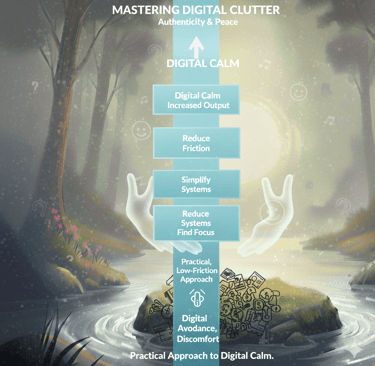
My post contentOne of the questions I’m asked most often is how to get a digital life under control. Between inboxes, messaging apps, browser tabs, files, notes, and task lists, it can feel like information is constantly piling up, with no clear place to put it.
An overflowing digital environment doesn’t just create visual clutter. It creates mental noise. The good news is that you don’t need an elaborate system to fix it. With a few intentional steps, you can bring a sense of order back into your digital world.
Below are three simple, practical principles that work together. They don’t require new tools, and they don’t aim for perfection, just clarity and ease.
Tip 1: Simplify Before You Organize
Organization becomes difficult when there’s simply too much to manage. The most effective first step is always simplification.
Set aside short, focused blocks of time over a few days and reduce the volume of what you’re dealing with:
Email: Spend 20–30 minutes archiving anything that doesn’t require action. Star or label messages that need follow-up. Reply immediately to anything that takes under a minute. Unsubscribe from newsletters and marketing emails you no longer read.
Browser tabs: Bookmark tabs you’re not actively using and close the rest. If a tab represents an action you need to take, bookmark it into a clearly labeled “Action” folder and add it to your task list.
Files: Delete documents you no longer need. Move older or rarely accessed items into a single “Archive” folder instead of letting them clutter your desktop.
You don’t need to simplify everything at once. Even partial reduction makes organization far easier.
Tip 2: Give Everything a Clear Home
Once the excess is reduced, the goal is simple: everything should have a designated place.
Think in terms of broad categories, not detailed hierarchies.
Email: Create one clear place for actionable messages (a star, label, or folder). Additional folders for projects or follow-ups are optional—simplicity matters more than completeness.
Browser: Use bookmarks and folders intentionally. If your browser supports separate spaces or profiles, assign them by function (work, finances, learning, writing).
Notes & documents: Stick with tools you already use. Avoid chasing the “perfect” note-taking system. Use rough folders or tags, and rely on search when needed.
Computer files: Create a small number of folders (e.g., finances, personal documents, writing, work projects). Keep your desktop clear.
Tasks: Keep task management minimal. A master list and a daily list are often enough. Capture actions from emails and tabs so you don’t have to remember them mentally.
The objective isn’t meticulous organization—it’s knowing where things belong so they don’t live in your head.
Tip 3: Protect Focus Through Intentional Use
Once your digital life is simplified and organized, focus becomes easier—and more important.
When working on a single task:
Close everything unrelated.
Use full-screen or distraction-free modes when possible.
Process email in dedicated time blocks instead of continuously.
Keep only the documents or tabs needed for the task at hand.
If distractions are a problem, use site blockers during focus periods. When it’s time to organize, focus on organizing—and stop when your allotted time ends.
This isn’t about maintaining a perfectly tidy system. It’s about creating enough order that your attention can stay on what matters.
A well-organized digital life doesn’t require constant maintenance or complex tools. It requires clear places, regular simplification, and the discipline to focus on one thing at a time.
That alone can dramatically reduce mental clutter—and make your digital world feel workable again.